

有279人阅读过
随机生成彩色点的代码
发布于2023/11/08 更新于2023/11/08
[ 教程仅保证更新时有效,请自行测试。]
发布于2023/11/08 更新于2023/11/08
[ 教程仅保证更新时有效,请自行测试。]
[ 教程仅保证更新时有效,请自行测试。]
py代码如下:
import os
import random
from PIL import Image
output_directory = "output_images"  # 保存图片的目录
os.makedirs(output_directory, exist_ok=True)
# 尺寸
width = 320
height = 320
# 单个像素点尺寸
pixel_size = 10
columns = width // pixel_size
rows = height // pixel_size
# 定义可选的颜色,确保黑色占多数
colors = ["#000000", "#FF0000", "#00FF00", "#0000FF", "#FFFF00", "#800080"]
black_percentage = 0.95  # 95% 的机会是黑色
# 检查是否与相邻像素相同颜色
def is_not_adjacent(x, y, color):
    neighbors = [
        (-1, 0), (1, 0), (0, -1), (0, 1)
    ]

    for dx, dy in neighbors:
        nx, ny = x + dx, y + dy
        if 0 <= nx < columns and 0 <= ny < rows:
            neighbor_color = pixels[nx * pixel_size, ny * pixel_size]
            if neighbor_color == color:
                return False
    return True
# 创建100张图片
for image_number in range(1, 101):
    image = Image.new("RGB", (width, height))
    pixels = image.load()
    # 随机生成彩色像素,确保没有相邻的彩色块
    for x in range(columns):
        for y in range(rows):
            random_value = random.random()
            if random_value < black_percentage:
                pixel_color = (0, 0, 0)
            else:
                while True:
                    pixel_color = tuple(int(random.choice(colors).lstrip('#')[i:i + 2], 16) for i in (0, 2, 4))
                    if is_not_adjacent(x, y, pixel_color):
                        break
            for i in range(pixel_size):
                for j in range(pixel_size):
                    pixels[x * pixel_size + i, y * pixel_size + j] = pixel_color
    # 保存生成的图像到指定目录
    image_filename = os.path.join(output_directory, f"image_{image_number:02d}.png")
    image.save(image_filename)
print("生成了50张图片并保存在目录:", output_directory)
可能需要安装PIL库
pip install pillow
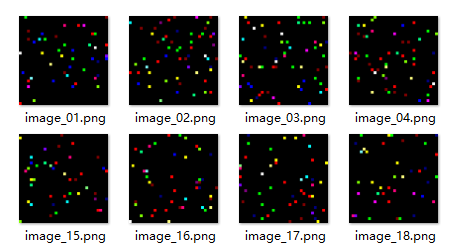
完成版:
 随机彩色点.rar # html 版
文章对你有帮助吗?
- 一般[0]

- 很赞[0]

- 没用[0]

- 垃圾[0]

- 无语[0]