有258人阅读过
一个M3U直播源合并和分组整理工具
发布于2025/07/23 更新于2025/07/23
[ 教程仅保证更新时有效,请自行测试。]
发布于2025/07/23 更新于2025/07/23
[ 教程仅保证更新时有效,请自行测试。]
[ 教程仅保证更新时有效,请自行测试。]
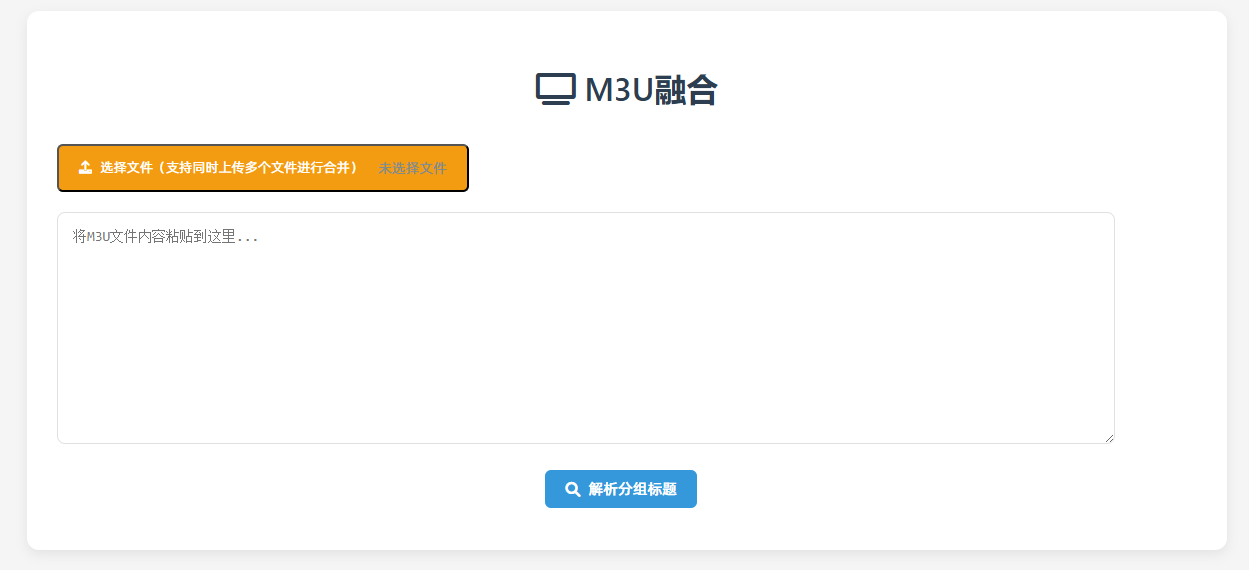
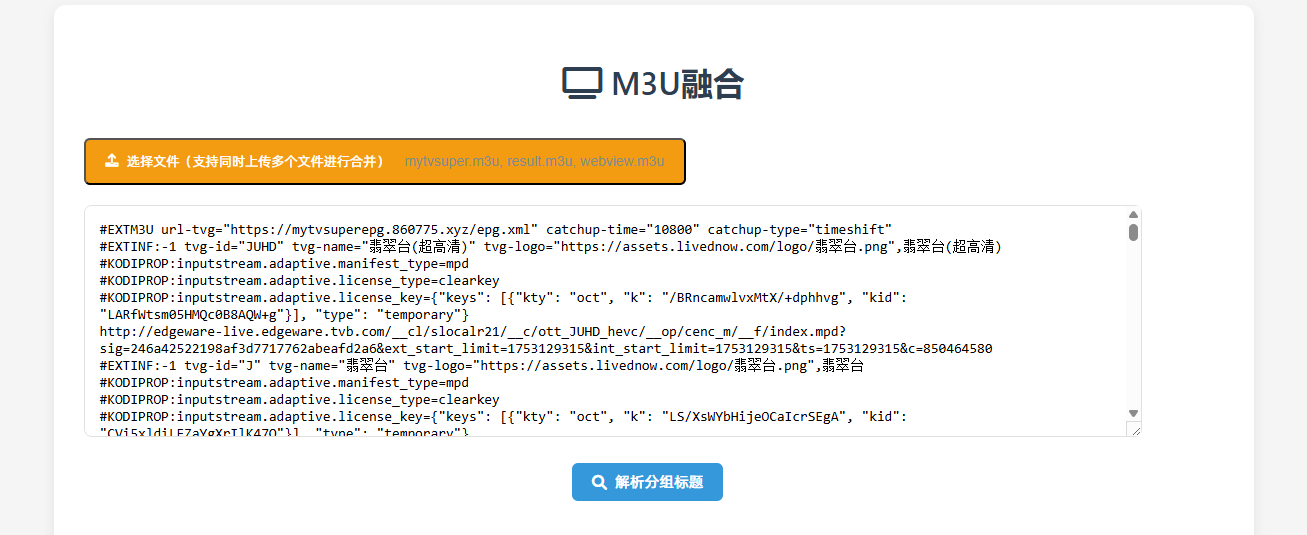
可以把多个M3U文件合并为一个,对分组名称进行修改,整理,输出为合并后的文件。
文件下载: M3U.rar
文件是一个单一的html文件,可本地浏览器打开使用。
在线效果:M3U分组整理
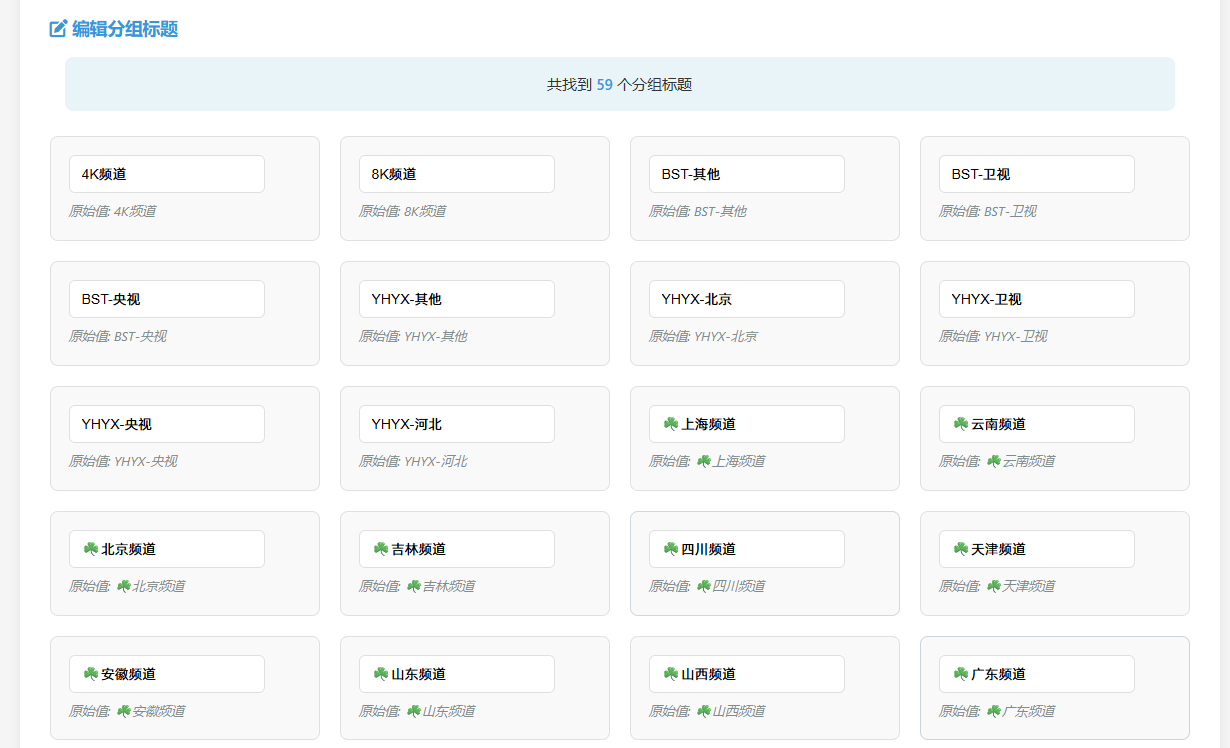
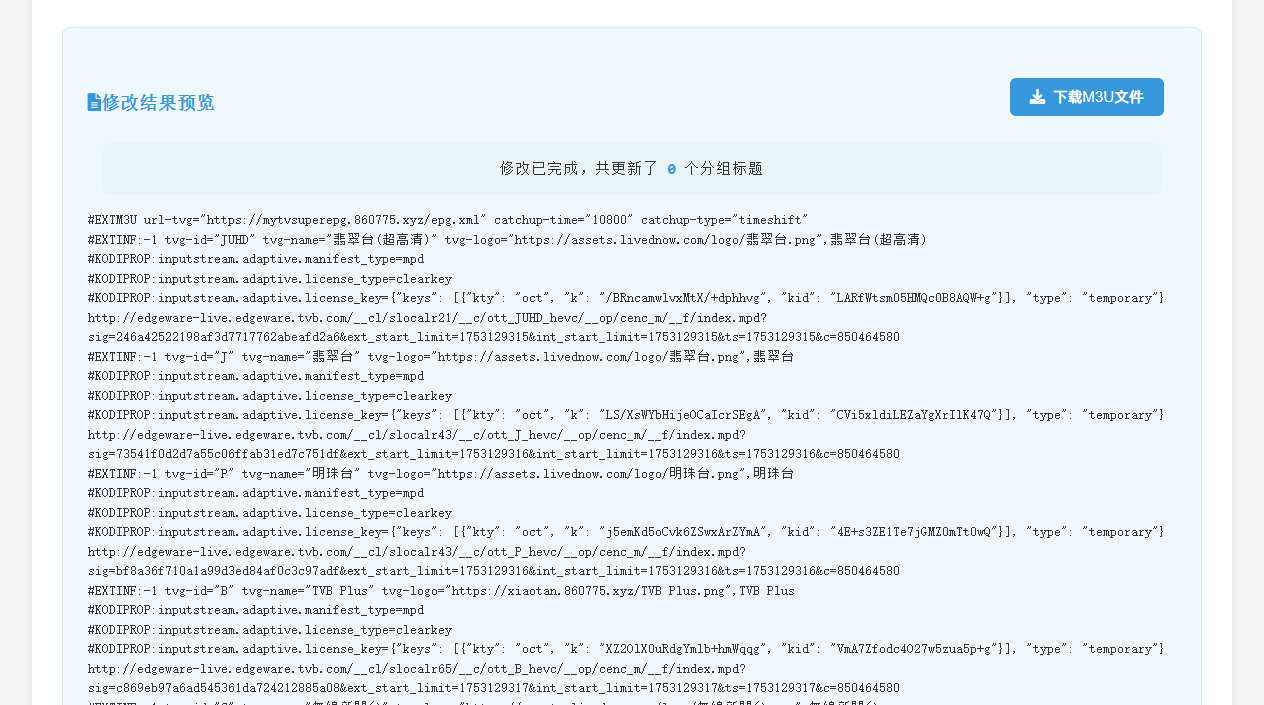
网页代码如下:
<!DOCTYPE html>
<html>
<head>
<meta charset="UTF-8">
<meta name="viewport" content="width=device-width, initial-scale=1.0">
<title>M3U分组整理</title>
<style>
:root {
--primary-color: #3498db;
--primary-hover: #2980b9;
--success-color: #2ecc71;
--success-hover: #27ae60;
--danger-color: #e74c3c;
--danger-hover: #c0392b;
--warning-color: #f39c12;
--warning-hover: #d35400;
--text-color: #333;
--light-text: #7f8c8d;
--bg-color: #f5f5f5;
--card-bg: #fff;
--border-color: #e0e0e0;
--highlight-bg: #f0f8ff;
--shadow: 0 4px 12px rgba(0,0,0,0.08);
}
body {
font-family: 'Segoe UI', 'Microsoft YaHei', system-ui, sans-serif;
max-width: 1200px;
margin: 0 auto;
padding: 20px;
line-height: 1.6;
color: var(--text-color);
background-color: var(--bg-color);
}
h1 {
text-align: center;
color: #2c3e50;
margin-bottom: 30px;
font-weight: 600;
font-size: 2rem;
}
.container {
background-color: var(--card-bg);
padding: 30px;
border-radius: 12px;
box-shadow: var(--shadow);
transition: all 0.3s ease;
}
.section-title {
display: block;
margin: 25px 0 15px;
color: var(--primary-color);
font-weight: 600;
font-size: 1.1rem;
}
.section-header {
display: flex;
justify-content: space-between;
align-items: center;
margin: 25px 0 15px;
}
.section-title-with-button {
display: flex;
align-items: center;
color: var(--primary-color);
font-weight: 600;
font-size: 1.1rem;
}
textarea {
min-width: 90%;
height: 200px;
margin-bottom: 20px;
padding: 15px;
border: 1px solid var(--border-color);
border-radius: 8px;
font-size: 14px;
resize: vertical;
transition: border 0.3s;
font-family: Consolas, Monaco, monospace;
}
textarea:focus {
border-color: var(--primary-color);
outline: none;
box-shadow: 0 0 0 2px rgba(52, 152, 219, 0.2);
}
.btn {
display: inline-flex;
align-items: center;
justify-content: center;
background-color: var(--primary-color);
color: white;
padding: 10px 20px;
border: none;
border-radius: 6px;
cursor: pointer;
font-size: 15px;
font-weight: 500;
margin-right: 12px;
margin-bottom: 12px;
transition: all 0.3s;
min-width: 120px;
line-height: 1.2;
}
.btn:hover {
background-color: var(--primary-hover);
transform: translateY(-1px);
box-shadow: 0 2px 8px rgba(0,0,0,0.1);
}
.btn:active {
transform: translateY(0);
}
.btn i {
margin-right: 8px;
}
.btn-sm {
padding: 8px 15px;
font-size: 14px;
min-width: auto;
}
.btn-success {
background-color: var(--success-color);
}
.btn-success:hover {
background-color: var(--success-hover);
}
.btn-danger {
background-color: var(--danger-color);
}
.btn-danger:hover {
background-color: var(--danger-hover);
}
.btn-warning {
background-color: var(--warning-color);
}
.btn-warning:hover {
background-color: var(--warning-hover);
}
.editor-container {
margin-top: 30px;
display: none;
animation: fadeIn 0.5s ease;
}
.group-grid {
display: grid;
grid-template-columns: repeat(auto-fill, minmax(250px, 1fr));
gap: 20px;
margin: 25px 0;
}
.group-item {
padding: 18px;
border: 1px solid var(--border-color);
border-radius: 8px;
background-color: #f9f9f9;
transition: all 0.3s;
}
.group-item:hover {
border-color: var(--primary-color);
box-shadow: 0 2px 8px rgba(0,0,0,0.05);
}
.group-item input {
padding: 10px 12px;
border: 1px solid var(--border-color);
border-radius: 6px;
font-size: 14px;
transition: all 0.3s;
}
.group-item input:focus {
border-color: var(--primary-color);
box-shadow: 0 0 0 2px rgba(52, 152, 219, 0.2);
outline: none;
}
.original-value {
color: var(--light-text);
font-size: 13px;
margin-top: 8px;
font-style: italic;
}
.actions {
margin-top: 30px;
display: flex;
flex-wrap: wrap;
justify-content: center;
gap: 15px;
}
#result {
margin-top: 30px;
padding: 25px;
background-color: var(--highlight-bg);
border: 1px solid #d6e9ff;
border-radius: 8px;
display: none;
font-family: Consolas, Monaco, monospace;
font-size: 13px;
line-height: 1.5;
word-break: break-all;
overflow-wrap: break-word;
}
#result pre {
margin: 0;
white-space: pre-wrap;
word-break: break-word;
}
.stats {
margin: 15px;
padding: 15px;
background-color: #e8f4f8;
border-radius: 8px;
font-size: 15px;
text-align: center;
}
.stats strong {
color: var(--primary-color);
font-weight: 600;
}
.file-input-wrapper {
position: relative;
display: inline-block;
margin-bottom: 20px;
}
.file-input-wrapper input[type="file"] {
position: absolute;
left: 0;
top: 0;
opacity: 0;
width: 100%;
height: 100%;
cursor: pointer;
}
.file-input-label {
display: inline-flex;
align-items: center;
padding: 12px 20px;
background-color: var(--warning-color);
color: white;
border-radius: 6px;
cursor: pointer;
transition: all 0.3s;
}
.file-input-label:hover {
background-color: var(--warning-hover);
transform: translateY(-1px);
}
.file-input-label i {
margin-right: 8px;
}
.file-name {
margin-left: 15px;
color: var(--light-text);
font-size: 14px;
}
@keyframes fadeIn {
from { opacity: 0; transform: translateY(10px); }
to { opacity: 1; transform: translateY(0); }
}
@media (max-width: 768px) {
.container {
padding: 20px;
}
.group-grid {
grid-template-columns: 1fr;
}
.actions {
flex-direction: column;
align-items: center;
}
.btn {
width: 100%;
margin-right: 0;
}
.section-header {
flex-direction: column;
align-items: flex-start;
gap: 10px;
}
}
</style>
<link rel="stylesheet" href="https://cdnjs.cloudflare.com/ajax/libs/font-awesome/6.0.0-beta3/css/all.min.css">
</head>
<body>
<div>
<h1><i class="fas fa-tv"></i> M3U融合</h1>
<div>
<button>
<i class="fas fa-upload"></i> 选择文件(支持同时上传多个文件进行合并)
<span id="fileName">未选择文件</span>
</button>
<input type="file" id="fileInput" accept=".m3u,.txt" multiple>
</div>
<textarea id="m3uContent" placeholder="将M3U文件内容粘贴到这里..."></textarea>
<div style="text-align: center;">
<button id="parseBtn">
<i class="fas fa-search"></i> 解析分组标题
</button>
</div>
<div id="editorContainer">
<h2><i class="fas fa-edit"></i> 编辑分组标题</h2>
<div id="stats"></div>
<div id="groupsList"></div>
<div>
<button id="applyBtn" class="btn btn-success">
<i class="fas fa-check"></i> 应用更改
</button>
<button id="resetBtn" class="btn btn-danger">
<i class="fas fa-undo"></i> 重置所有修改
</button>
</div>
</div>
<div id="result"></div>
</div>
<script>
document.addEventListener('DOMContentLoaded', function () {
const m3uContent = document.getElementById('m3uContent');
const parseBtn = document.getElementById('parseBtn');
const fileInput = document.getElementById('fileInput');
const fileName = document.getElementById('fileName');
const editorContainer = document.getElementById('editorContainer');
const groupsList = document.getElementById('groupsList');
const applyBtn = document.getElementById('applyBtn');
const resetBtn = document.getElementById('resetBtn');
const resultDiv = document.getElementById('result');
const statsDiv = document.getElementById('stats');
let originalContent = '';
let groupTitles = [];
fileInput.addEventListener('change', function () {
const files = Array.from(fileInput.files);
if (files.length === 0) {
fileName.textContent = '未选择文件';
return;
}
fileName.textContent = files.map(f => f.name).join(', ');
const readers = files.map(file => {
return new Promise((resolve, reject) => {
const reader = new FileReader();
reader.onload = e => resolve(e.target.result);
reader.onerror = e => reject(e);
reader.readAsText(file, 'UTF-8');
});
});
Promise.all(readers)
.then(contents => {
const mergedContent = contents.join('\n\n');
m3uContent.value = mergedContent;
originalContent = mergedContent;
parseBtn.click(); // 自动解析
})
.catch(err => {
alert('读取文件失败:' + err.message);
});
});
parseBtn.addEventListener('click', function () {
originalContent = m3uContent.value.trim();
if (!originalContent) {
alert('请上传或粘贴 M3U 文件内容');
return;
}
groupTitles = extractGroupTitles(originalContent);
if (groupTitles.length === 0) {
alert('未找到任何 group-title');
return;
}
statsDiv.innerHTML = `共找到 <strong>${groupTitles.length}</strong> 个分组标题`;
displayGroupEditor(groupTitles);
editorContainer.style.display = 'block';
// 滚动到编辑器
editorContainer.scrollIntoView({ behavior: 'smooth' });
});
applyBtn.addEventListener('click', function () {
const modifiedContent = applyGroupTitleChanges(originalContent, groupTitles);
const changesCount = countChanges();
// 创建结果区域的HTML
const resultHTML = `
<div>
<div>
<i class="fas fa-file-alt"></i> 修改结果预览
</div>
<button id="resultDownloadBtn">
<i class="fas fa-download"></i> 下载M3U文件
</button>
</div>
<div>修改已完成,共更新了 <strong>${changesCount}</strong> 个分组标题</div>
<pre>${modifiedContent}</pre>
`;
resultDiv.innerHTML = resultHTML;
resultDiv.style.display = 'block';
m3uContent.value = modifiedContent;
// 为结果区域中的下载按钮添加事件监听
document.getElementById('resultDownloadBtn').addEventListener('click', function() {
const defaultName = fileInput.files[0] ?
fileInput.files[0].name.replace(/\.[^/.]+$/, "") + '_modified.m3u' :
'修改后的播放列表.m3u';
downloadFile(defaultName, modifiedContent);
});
// 滚动到结果
resultDiv.scrollIntoView({ behavior: 'smooth' });
});
resetBtn.addEventListener('click', function () {
if (confirm('确定要重置所有修改吗?所有编辑将被丢弃。')) {
displayGroupEditor(groupTitles);
resultDiv.style.display = 'none';
}
});
function extractGroupTitles(content) {
const lines = content.split('\n');
const groups = new Set();
for (let line of lines) {
line = line.trim();
if (line.startsWith('#EXTINF:-1')) {
const match = line.match(/group-title="([^"]+)"/);
if (match && match[1]) {
groups.add(match[1]);
}
}
}
return Array.from(groups).sort();
}
function displayGroupEditor(groups) {
groupsList.innerHTML = '';
groups.forEach(group => {
const groupItem = document.createElement('div');
groupItem.className = 'group-item';
const input = document.createElement('input');
input.type = 'text';
input.value = group;
input.dataset.original = group;
input.placeholder = '输入新的分组名称';
const originalSpan = document.createElement('div');
originalSpan.className = 'original-value';
originalSpan.textContent = `原始值: ${group}`;
groupItem.appendChild(input);
groupItem.appendChild(originalSpan);
groupsList.appendChild(groupItem);
});
}
function applyGroupTitleChanges(content, groups) {
let modified = content;
const inputs = groupsList.querySelectorAll('input');
inputs.forEach(input => {
const orig = input.dataset.original;
const curr = input.value.trim();
if (orig !== curr && curr !== '') {
const re = new RegExp(`group-title="${orig}"`, 'g');
modified = modified.replace(re, `group-title="${curr}"`);
}
});
// 清理所有以 #EXTM3U 开头的行,只保留第一个
const lines = modified.split('\n');
let extm3uFound = false;
const cleanedLines = [];
for (let line of lines) {
const trimmedLine = line.replace(/^\uFEFF/, '').trim();
if (/^#EXTM3U/i.test(trimmedLine)) {
if (!extm3uFound) {
cleanedLines.push(trimmedLine); // 保留第一个
extm3uFound = true;
}
// 跳过其他
} else {
cleanedLines.push(line);
}
}
return cleanedLines.join('\n');
}
function countChanges() {
let count = 0;
groupsList.querySelectorAll('input').forEach(input => {
if (input.value.trim() !== input.dataset.original && input.value.trim() !== '') {
count++;
}
});
return count;
}
function downloadFile(filename, content) {
const element = document.createElement('a');
element.setAttribute('href', 'data:text/plain;charset=utf-8,' + encodeURIComponent(content));
element.setAttribute('download', filename);
element.style.display = 'none';
document.body.appendChild(element);
element.click();
document.body.removeChild(element);
}
});
</script>
</body>
</html>文章对你有帮助吗?
- 一般[0]

- 很赞[0]

- 没用[0]

- 垃圾[0]

- 无语[0]