
有245人阅读过
一个TXT和M3U格式互转的工具
发布于2025/07/29 更新于2025/07/29
[ 教程仅保证更新时有效,请自行测试。]
发布于2025/07/29 更新于2025/07/29
[ 教程仅保证更新时有效,请自行测试。]
[ 教程仅保证更新时有效,请自行测试。]
快速实现TXT转M3U,或M3U转TXT格式直播源,支持DIYP分组格式

在线测试:IPTV-M3U转换工具
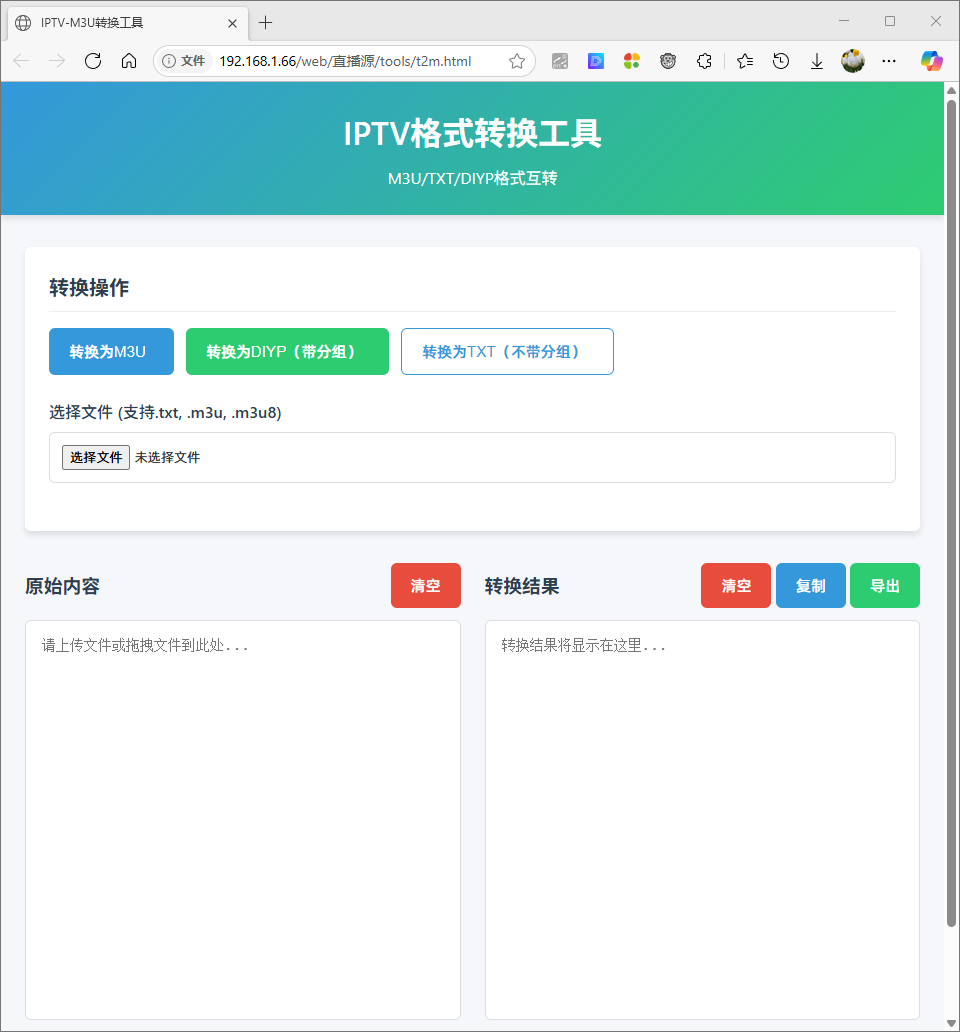
代码如下:
<!DOCTYPE html>
<html>
<head>
<meta charset="UTF-8">
<meta name="viewport" content="width=device-width, initial-scale=1.0">
<title>IPTV-M3U转换工具</title>
<style>
:root {
--primary-color: #3498db;
--secondary-color: #2ecc71;
--danger-color: #e74c3c;
--dark-color: #2c3e50;
--light-color: #ecf0f1;
--border-radius: 6px;
--box-shadow: 0 4px 6px rgba(0, 0, 0, 0.1);
--transition: all 0.3s ease;
}
* {
box-sizing: border-box;
margin: 0;
padding: 0;
}
body {
font-family: 'Segoe UI', Tahoma, Geneva, Verdana, sans-serif;
background-color: #f5f7fa;
color: #333;
line-height: 1.6;
min-height: 100vh;
display: flex;
flex-direction: column;
}
.header {
background: linear-gradient(135deg, var(--primary-color), var(--secondary-color));
color: white;
padding: 1.5rem 0;
text-align: center;
box-shadow: var(--box-shadow);
margin-bottom: 2rem;
}
.header h1 {
font-size: 2rem;
font-weight: 600;
margin-bottom: 0.5rem;
}
.container {
max-width: 1200px;
margin: 0 auto;
padding: 0 1.5rem;
flex: 1;
width: 100%;
}
.card {
background: white;
border-radius: var(--border-radius);
box-shadow: var(--box-shadow);
padding: 1.5rem;
margin-bottom: 2rem;
}
.card-title {
font-size: 1.25rem;
margin-bottom: 1rem;
color: var(--dark-color);
font-weight: 600;
border-bottom: 1px solid #eee;
padding-bottom: 0.5rem;
}
.button-group {
display: flex;
gap: 0.75rem;
flex-wrap: wrap;
margin-bottom: 1.5rem;
}
.button {
padding: 0.75rem 1.25rem;
border: none;
border-radius: var(--border-radius);
font-size: 0.95rem;
font-weight: 500;
cursor: pointer;
transition: var(--transition);
display: inline-flex;
align-items: center;
justify-content: center;
gap: 0.5rem;
}
.button-primary {
background-color: var(--primary-color);
color: white;
}
.button-secondary {
background-color: var(--secondary-color);
color: white;
}
.button-danger {
background-color: var(--danger-color);
color: white;
}
.button-outline {
background-color: transparent;
border: 1px solid var(--primary-color);
color: var(--primary-color);
}
.button:hover {
transform: translateY(-2px);
box-shadow: 0 6px 12px rgba(0, 0, 0, 0.1);
}
.file-input {
margin-bottom: 1.5rem;
}
.file-input label {
display: block;
margin-bottom: 0.5rem;
font-weight: 500;
color: var(--dark-color);
}
.file-input input[type="file"] {
width: 100%;
padding: 0.75rem;
border: 1px solid #ddd;
border-radius: var(--border-radius);
background-color: white;
}
.preview-container {
display: flex;
flex-wrap: wrap;
gap: 1.5rem;
margin-top: 1.5rem;
}
.preview-column {
flex: 1;
min-width: 300px;
}
.preview-header {
display: flex;
justify-content: space-between;
align-items: center;
margin-bottom: 0.75rem;
}
.preview-title {
font-weight: 600;
color: var(--dark-color);
}
.preview-content {
width: 100%;
height: 400px;
padding: 1rem;
border: 1px solid #ddd;
border-radius: var(--border-radius);
background-color: white;
font-family: 'Courier New', Courier, monospace;
font-size: 0.9rem;
resize: none;
overflow-y: auto;
}
.footer {
text-align: center;
padding: 1.5rem;
margin-top: 2rem;
background-color: var(--dark-color);
color: white;
}
.footer .copyright {
font-size: 0.9rem;
}
@media (max-width: 768px) {
.preview-container {
flex-direction: column;
}
.preview-column {
width: 100%;
}
.button-group {
flex-direction: column;
}
}
/* 动画效果 */
@keyframes fadeIn {
from { opacity: 0; transform: translateY(10px); }
to { opacity: 1; transform: translateY(0); }
}
.card {
animation: fadeIn 0.5s ease-out;
}
/* 工具提示 */
.tooltip {
position: relative;
display: inline-block;
}
.tooltip .tooltiptext {
visibility: hidden;
width: 200px;
background-color: #333;
color: #fff;
text-align: center;
border-radius: 6px;
padding: 5px;
position: absolute;
z-index: 1;
bottom: 125%;
left: 50%;
transform: translateX(-50%);
opacity: 0;
transition: opacity 0.3s;
font-size: 0.8rem;
}
.tooltip:hover .tooltiptext {
visibility: visible;
opacity: 1;
}
</style>
</head>
<body>
<header>
<h1>IPTV格式转换工具</h1>
<p>M3U/TXT/DIYP格式互转</p>
</header>
<div>
<div>
<h2>转换操作</h2>
<div>
<button class="button button-primary" onclick="convertToM3U()">
<span>转换为M3U</span>
<span>
<span>将TXT/DIYP格式转换为M3U格式</span>
</span>
</button>
<button class="button button-secondary" onclick="convertToDiyp()">
<span>转换为DIYP(带分组)</span>
<span>
<span>将M3U格式转换为DIYP格式</span>
</span>
</button>
<button class="button button-outline" onclick="convertToTXT()">
<span>转换为TXT(不带分组)</span>
<span>
<span>将M3U格式转换为简单TXT格式</span>
</span>
</button>
</div>
<div>
<label for="fileInput">选择文件 (支持.txt, .m3u, .m3u8)</label>
<input type="file" id="fileInput" accept=".txt,.m3u,.m3u8" onchange="updatePreview('fileInput', 'previewBefore')">
</div>
</div>
<div>
<div id="container">
<div>
<h3>原始内容</h3>
<button class="button button-danger" onclick="clearBefore()">清空</button>
</div>
<textarea id="previewBefore" placeholder="请上传文件或拖拽文件到此处..."></textarea>
</div>
<div>
<div>
<h3>转换结果</h3>
<div>
<button class="button button-danger" onclick="clearAfter()">清空</button>
<button class="button button-primary" onclick="copyContent()">复制</button>
<button class="button button-secondary" onclick="exportConvertedFile()">导出</button>
</div>
</div>
<textarea id="previewAfter" placeholder="转换结果将显示在这里..."></textarea>
</div>
</div>
</div>
<footer>
<div>© 2024 群晖直播 Rights Reserved.</div>
</footer>
<script>
// 保持原有的JavaScript功能不变
function findLineNumber(text, searchText) {
var regex = new RegExp(searchText, 'g');
var lines = text.split('\n');
var lineNumber = 0;
for (var i = 0; i < lines.length; i++) {
if (lines[i].match(regex)) {
return lineNumber;
}
lineNumber++;
}
return -1;
}
function TxtToM3U(txtPreview) {
var m3uContent='';
if(txtPreview == null || txtPreview=='') return '';
var lines = txtPreview.split("\n");
if (txtPreview.includes("#EXTM3U") || txtPreview.includes("#EXTINF")) {
var errline=findLineNumber(txtPreview,"#EXTM3U");
if(errline==-1){
errline=findLineNumber(txtPreview,"#EXTINF");
}
m3uContent = "检测到"+ (errline+1) + "行包含特定字符EXTM3U或者EXTINF,请检查文本内容,可能已经是m3u格式";
return m3uContent;
}
if(!txtPreview.includes(",")) {
m3uContent = "文本内容不包含分隔','字符,无法转换";
return m3uContent;
}
m3uContent = "#EXTM3U x-tvg-url=\"http://epg.51zmt.top:8000/e.xml,https://epg.112114.xyz/pp.xml\"\n";
var tempUrls = [];
var lastGroupName = '';
lines.forEach(function(line) {
if (line.trim() !== "") {
if (line.includes("#genre#")) {
var groupName = line.split(",")[0].trim();
groupName = groupName.replace(/^\s*|\s*$/g, '');
if (groupName != null && groupName !== "") {
lastGroupName = groupName;
}
} else {
if(line.includes(",")){
var channelName = line.split(",")[0].trim();
var channelUrl = line.split(",")[1].trim();
if (channelName != '' && channelUrl != '' && !tempUrls.includes(channelUrl)) {
if (lastGroupName !== "") {
m3uContent += "#EXTINF:-1 group-title=\"" + lastGroupName + "\"," + channelName + "\n";
} else {
m3uContent += "#EXTINF:-1," + channelName + "\n";
}
m3uContent += channelUrl + "\n";
tempUrls.push(channelUrl);
}
}
}
}
});
return m3uContent;
}
function convertToM3U() {
var txtPreview = document.getElementById("previewBefore");
var m3uPreview = document.getElementById("previewAfter");
m3uPreview.value=TxtToM3U(txtPreview.value);
convertedData = m3uPreview.value;
}
function M3uToDiyp(m3uPreview) {
var txtContent = "";
if(m3uPreview == null || m3uPreview=='') return '';
var lines = m3uPreview.split("\n");
if (!m3uPreview.includes("#EXTM3U") && !m3uPreview.includes("#EXTINF")) {
txtContent = "不是M3U格式,可能已经是DIYP/TXT格式,无法转换";
return txtContent;
}
var lastgroupName = "";
for (var i = 0; i < lines.length; i++) {
var line = lines[i].trim();
if (line.startsWith("#EXTINF")) {
var groupName = getGroupName(line);
if (groupName != null && groupName != '' && groupName != lastgroupName) {
txtContent += groupName + ",#genre#\n";
lastgroupName = groupName;
}
var name='频道名解析错误';
var match = line.match(/tvg-name=\"([^\"]+)\"/);
if (match) {
name=match[1];
} else {
var count = (line.match(/,/g) || []).length;
if(count>1){
name = line.split(",")[count].trim();
}
else{
name = line.split(",")[1].trim();
}
}
name=name.replace(/\s*/g, '');
var url = lines[i + 1].trim();
if(name!=''&&url!=''){
txtContent += name + "," + url + "\n";
}
}
}
if (txtContent != '' && lastgroupName == '') {
txtContent = "国际,#genre#\n" + txtContent;
}
return txtContent;
}
function convertToDiyp() {
var m3uPreview = document.getElementById("previewBefore");
var txtPreview = document.getElementById("previewAfter");
txtPreview.value = M3uToDiyp(m3uPreview.value);
convertedData = txtPreview.value;
}
function M3uToTXT(m3uPreview) {
var txtContent = "";
if(m3uPreview == null || m3uPreview=='') return '';
var lines = m3uPreview.split("\n");
if (!m3uPreview.includes("#EXTM3U") && !m3uPreview.includes("#EXTINF")) {
txtContent = "不是M3U格式,可能已经是DIYP/TXT格式,无法转换";
return txtContent;
}
for (var i = 0; i < lines.length; i++) {
var line = lines[i].trim();
if (line.startsWith("#EXTINF")) {
var name='频道名解析错误';
var count = (line.match(/,/g) || []).length;
if(count>1){
name = line.split(",")[count].trim();
}
else{
name = line.split(",")[1].trim();
}
var url = lines[i + 1].trim();
if(name!=''&&url!=''){
txtContent += name + "," + url + "\n";
}
}
}
return txtContent;
}
function convertToTXT() {
var m3uPreview = document.getElementById("previewBefore");
var txtPreview = document.getElementById("previewAfter");
txtPreview.value = M3uToTXT(m3uPreview.value);
convertedData = txtPreview.value;
}
function updatePreview(inputId, previewId) {
var fileInput = document.getElementById(inputId);
var file = fileInput.files[0];
var reader = new FileReader();
reader.onload = function(e) {
var contents = e.target.result;
var preview = document.getElementById(previewId);
preview.value = contents;
};
reader.readAsText(file);
}
function exportConvertedFile() {
if (typeof convertedData == 'undefined' || convertedData == null || convertedData == '') {
alert('没有可导出的内容!');
return;
}
const blob = new Blob([convertedData], { type: 'text/plain' });
const url = URL.createObjectURL(blob);
const link = document.createElement('a');
link.href = url;
// 根据内容自动判断文件类型
if (convertedData.includes("#EXTM3U")) {
link.download = 'iptv_playlist.m3u';
} else {
link.download = 'iptv_channels.txt';
}
link.click();
URL.revokeObjectURL(url);
}
function getGroupName(str) {
const regex = /group-title\s*=\s*"(.*?)"/;
const result = str.match(regex);
if (result && result.length > 1) {
const groupTitle = result[1];
return groupTitle.replace(/^\s*|\s*$/g, '');
}
}
function clearBefore() {
var m3uPreview = document.getElementById("previewBefore");
m3uPreview.value = '';
var fileInput = document.getElementById("fileInput");
fileInput.value = '';
}
function clearAfter() {
var txtPreview = document.getElementById("previewAfter");
txtPreview.value = '';
convertedData = '';
}
function copyContent() {
const m3uOutput = document.getElementById('previewAfter');
m3uOutput.select();
if(m3uOutput.value == '') {
alert('没有内容可复制!');
return;
}
document.execCommand('copy');
alert('内容已复制到剪贴板!');
}
// 拖拽功能
var box = document.getElementById('container');
document.ondrop = function(e){
e.preventDefault();
}
document.ondragover = function(e){
e.preventDefault();
}
box.ondrop = function(e){
var dataFile = e.dataTransfer.files[0];
var fr = new FileReader();
fr.readAsText(dataFile);
fr.onload = function(){
var data = fr.result;
var ta = document.getElementById('previewBefore');
ta.value = data;
}
}
// Ctrl+S 快捷键保存
window.addEventListener("keydown", function(e) {
if((e.key=='s'||e.key=='S')&&(navigator.platform.match("Mac") ? e.metaKey : e.ctrlKey)){
e.preventDefault();
exportConvertedFile();
}
}, false);
</script>
</body>
</html>文章对你有帮助吗?
- 一般[0]

- 很赞[0]

- 没用[0]

- 垃圾[0]

- 无语[0]